User manual and frequently asked questions Fry Delight FX100040 Low Fat Fryer – 800g / White
The healthy and versatile fryer that cooks crispy and tasty fried food using little to no oil*
• Air Pulse Technology uses pulsed hot air to prepare crisp, tasty and healthy fried food with little to no oil* • Versatile, easy-to-use fryer can also grill, roast and bake all your favourite meals with superb results • Cooks two servings of chips in 15 minutes** – prepare healthy dishes for your family in no time, every day **500g of thin frozen chips/fries cooked in 15 minutes at 200°C with preheat time
You can vary your pleasures and use different oils! Standard oils: olive, rapeseed*, grape seed, corn, peanut, sunflower, soybean* Flavoured oils: aromatic herbs, chilli, garlic, lemon... Special oils: hazelnut*, sesame*, safflower*, almond*, avocado*, argan*... We advise against using walnut oil, which results in a rancid taste after cooking. (* cooking oil according to manufacturer).
Wash the cut chips twice in a bowl of water before cooking to remove any excess starch. It is then essential to dry them thoroughly before cooking in a clean, absorbent tea towel and finally patted dry with kitchen paper. If you are cooking frozen chips you do not need to add any oil as these already contain oil and could make the chips soggy. If using the 2 in1 feature (bowl + tray) after the food is cooked on the tray, cook the chips for a further 2-5 minutes after you've removed the tray to make them crispier.
There are many possible reasons: • You may not have used the right variety of potatoes. • The potatoes were insufficiently washed and dried prior to cooking and still contain too much starch. • The chips are too thick. Cut the chips thinner. • You have not used enough oil. Increase the amount of oil. • The filter may be obstructed. Clean the filter. (ActiFry models only)
The size of the chip affects how crunchy or soft it is. The thinner the chips, the more crunchy they will be and conversely, thicker chips will be softer inside. Depending on your taste preferences, you may vary the cooking time and the cut of your chips: thin: 8 x 8 mm/Standard: 10 x 10 mm/Thick: 13 x 13 mm.
For best results, wash the whole potatoes and then sliced potatoes in plenty of water until it runs clear. This allows you to remove as much starch as possible to prevent the chips from sticking together. Dry them thoroughly using a dry, absorbent kitchen towel. The chips should be completely dry before cooking.
In general, we recommend using special chip potatoes. For new potatoes, which are rich in water, we recommend that you cook the chips for a few extra minutes.
The size of the chip affects how crispy or soft it is. The thinner the chips, the more crispy they will be and conversely, thicker chips will be softer inside. According to your wishes, you can vary how you cut your chips: • Thin: 8 x 8 mm • Standard: 10 x 10 mm • Thick: 13 x 13 mm
You can also prepare frozen chips. Since they are pre-cooked, it is not necessary to add oil.
With Fry Delight, you can prepare dozens of delicious recipes for snacks, dishes and desserts and vary your pleasures every day! • Meat: you can fry, grill or roast many types of meat in Fry Delight, whether chicken, beef, duck, etc. • Vegetables: Fry Delight also allows you to grill vegetables such as carrots, courgettes, tomatoes, etc. • Cakes/tarts/quiches: in Fry Delight, you can also cook cakes, tarts, quiches, or clafoutis by positioning the thermostat at the recommended temperature. • Frozen food: frozen meals or snacks can also be prepared in Fry Delight. It is recommended to preheat the appliance for 3 minutes before adding the ingredients. It is not necessary to defrost ingredients before preparing them in Fry Delight. • Crispy chicken nuggets with potato muffins, homemade chips with delicious skewered prawns, choose the dish you desire and follow the recipe with Fry Delight.
You can prepare up to 800g of frozen chips. Do not exceed the recommended maximum cooking quantities or running times indicated at the risk of not obtaining the desired results and damaging your appliance.
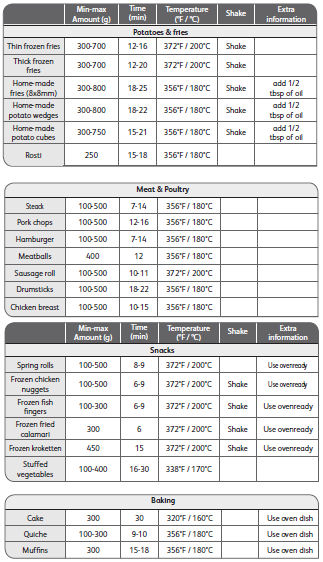
The table below will help you to set cooking times according to the food you want to prepare. The settings are provided as an example and may vary according to the variety of potato used. For other ingredients, the size, shape and brand may modify the cooking results. That is why you may have to adapt the cooking time slightly. The indicated cooking times are based on a preheating time of 3 minutes.
Preheating Fry Delight is optional and takes about 3 minutes. To preheat Fry Delight, set the timer to slightly more than 3 minutes. When the heating indicator switches off, fill the basket and set the timer to the required cooking time. You can also place the ingredients in the basket immediately, without preheating; in this case, cooking time will be 3 minutes longer.
Shaking the food in the basket allows warm air to reach contact zones between the food and obtain a more even cooking. Your food will be crispy and will have an attractive colour for an even more delicious result. For an even cooking result, we recommend shaking the food in contact with each other or spread out in more than one layer in the basket (chips, nuggets, etc.) half-way through the cooking process. For fragile food, place the food in the basket in a single layer because shaking it half-way through the cooking process may damage it.
When you shake the basket, check the colour of the ingredients as well. To shake the ingredients, remove the basket from the appliance by the handle. Remove the basket from the pan. Shake it over the pan and check that the food is well mixed. Put the basket and pan back in the appliance. Continue cooking.
Yes, you can use greaseproof paper or aluminium foil in your Fry Delight appliance.
However, never completely cover the bottom of the basket with these types of paper or any others. Proper air circulation in the basket will ensure optimum cooking of food. When the bottom of the basket is obstructed, the air flow circulating in the basket is reduced. This modifies your appliance's cooking performance.
Recommendations and rules for using greaseproof paper or aluminium foil in Fry delight:
- Never put greaseproof paper or aluminium foil in the appliance without putting food on it. The greaseproof paper/aluminium foil may be sucked into the heating block and burn. - Also ensure that the greaseproof paper or aluminium foil used only slightly exceeds the surface area of the food you are cooking. - You may use greaseproof paper in a tin provided that it only exceeds the edges of the tin slightly. The paper should never exceed the edge of the basket. - You may use aluminium foil or metal trays in the appliance. Use as little aluminium foil as possible and ensure that there is enough space around the food so that air can circulate around it better.
Do not put greaseproof paper or aluminium foil at the bottom of the pan where grease and cooking residues are collected. This would disturb the air flow in the basket and the cooking process would not be optimal.
Dishes designed for conventional ovens are compatible with Fry Delight. Materials: you may use dishes in stainless steel, aluminium, cast-iron, terracotta and silicone, as well as glass dishes designed for use in an oven. Dimensions: round dishes with a maximum diameter of 16.5 cm and square dishes with sides measuring no more than 14 cm may be used in Fry delight.
There is no danger in pulling out the basket during cooking, but it is not recommended. This will lower the temperature inside the device and, for "Smart" recipes, it may disrupt the cooking settings designed for optimal results.
It is best that the appliance be allowed to cool down before it is stored away. Make sure your appliance is unplugged. Leave to cool for one hour after use before storing away. You may speed up the cooling process by removing the pan and basket from the appliance. Caution, the pan and basket are very hot after use. Place them on a suitable heat-resistant surface.
Yes, Fry delight is fitted with rubber feet so that it can placed on a worktop.
However, be careful when removing the pan from the appliance after preheating or cooking. It is very hot and does not have support feet, therefore, the pan will be in direct contact with the worktop.
Recommendations and rules for using the hot pan on a worktop: - If your worktop is made with a heat-sensitive material, such as laminated wood, we recommend placing the pan on a trivet or an insulating oven glove. - If your worktop is made with a heat-resistant material, such as marble or metal, you can place the pan directly on it.
Tip: If dirt adheres to the basket or the bottom of the pan, fill the pan with warm water and dishwashing liquid. Put the basket in the pan and leave the pan and the basket to soak for about 10 minutes. In this way, food residue will loosen and will be easier to remove. The removal of food residue and fat depends on the quality of your detergent. Ensure that you use a detergent that can dissolve oil.
If grease marks remain in the tank or basket and you are unable to remove them with a suitable detergent, use a degreaser product. Follow the instructions on the packaging.
The coating of the pan and the basket is non-stick. Do not use metal kitchen utensils or abrasive cleaning products to clean them because they may damage the non-stick coating.
Unlike a conventional fryer, Fry Delight is not filled with oil. The outside of the appliance is not greasy after use.
Cleaning recommendations and rules: - Never immerse the body of the appliance in water because it contains electrical components and elements and never place it under the tap. - Wipe the outside of the appliance with a damp cloth. - Clean the inside of the appliance with warm water and a non-abrasive sponge. - Clean the heating element with a brush to remove food residue.
Tip: If dirt adheres to the basket or the bottom of the pan, fill the pan with warm water and dishwashing liquid. Put the basket in the pan and leave the pan and the basket to soak for about 10 minutes. In this way, food residue will come unstuck and will be easier to remove. The removal of food residue and fat depends on the quality of your detergent. Ensure that you use a detergent that can dissolve oil.
If grease marks remain in the tank or basket and you are unable to remove them with a suitable detergent, use a degreaser product. Follow the instructions on the packaging.
The coating of the pan and the basket is non-stick. Do not use metal kitchen utensils or abrasive cleaning products to clean them because they may damage the non-stick coating.
Tip: If dirt adheres to the basket or the bottom of the pan, fill the pan with warm water and dishwashing liquid. Put the basket in the pan and leave the pan and the basket to soak for about 10 minutes.
You can use a degreasing liquid to remove any remaining dirt. Clean the pan and the basket in warm water with dishwashing liquid and a non-abrasive sponge.
Rules for use: - Never immerse the body of the appliance in water because it contains electrical components and elements and never place it under the tap. - Wipe the exterior of the appliance with a damp cloth. - Clean the inside of the appliance with warm water and a non-abrasive sponge. - Clean the heating element with a brush to remove food residue.
Clean the device with a damp, non-abrasive sponge and washing-up liquid. Do not use any aggressive cleaning agents, scouring sponges or abrasive pads. Do not use any special metal cleaning agents. Never immerse or run the appliance under water.
You have probably salted your food during the cooking process. Don't salt your food before the end of cooking to avoid scratching. For models using the tray, and to preserve its qualities for longer, do not use any metal utensils.
Small marks may appear in the pan of the appliance following accidental contact with the coating (for example, when inserting the basket and/or when cleaning the appliance with aggressive products). If this is the case, we inform you that this is not dangerous because all the materials used have been designed not to pose a risk for food.
During cooking, ingredients with a high fat content release their excess grease or oil at the bottom of the pan. If this oil is heated it may produce white smoke. This has no effect on the appliance or the final result.
To stop the white smoke, follow the steps below:
- Switch off the appliance by turning the timer button to zero. - Put on gloves to protect your hands. - Take out the pan and remove the basket. Meanwhile, place the basket on a plate. You can cover the basket in order to maintain a maximum of heat inside the basket. - Remove the excess oil at the bottom of the pan. Use paper towels to do this. - Place the basket back in the pan and slide the pan into the appliance. - Continue cooking. Adjust the cooking time according to the remaining preparation time.
To avoid white smoke, follow the instructions below:
- Avoid preparing food with a very high fat content, such as sausages or other fatty meats. - When you buy snacks, read the label for details about their fat content. Whenever possible, opt for snacks with a low fat content. It will be difficult to obtain a crispy result with snacks with a high fat content. - Clean the pan immediately after preparing food with a high fat content. - Put on gloves and remove the excess oil at the bottom of the pan. Use paper towels to do this.
If you leave the oil to cool, it may condense at the bottom of the pan. In this case, it will be difficult to remove.
If the solution above has not helped you to solve the problem, contact the support service.
It is normal and not dangerous for the outside surface of the appliance to become hot. This is a result of the internal heat being diffused to the outside surface of the appliance during the cooking process. The manipulation of the handle and the temperature and cooking time setting buttons can be done without any danger while the appliance is heating.
The pan and the basket are very hot while the appliance is working. Caution is advised when handling these elements after the appliance has heated in order not to burn yourself.
After a prolonged period of use, some parts of the appliance will be very hot. The following icon allows you to identify these parts:
When you slide the pan into the appliance, you will hear a click that indicates that the pan is correctly in place.
If the pan does not slide into the product easily, check that: - The basket has been correctly lowered in the pan. When you look at the side of the pan, the basket should not be visible and should disappear completely into the pan. - The basket has not been filled with ingredients over the MAX level.
If the solutions above have not helped you to solve your problem, contact the support service.
When turning on the Fry Delight, the heating indicator comes on and you should hear the fan running. If, after setting the timer, neither the light indicator nor the fan turn on, check the following points:
- The plug has been inserted correctly in the mains socket. - You have set the timer to 3 minutes or more. The timer starts the appliance. - The power socket is working. If several appliances are connected to this socket, try a different socket and check your fuses.
If the solution above has not helped you to solve your problem, contact the support service.
The appearance of bubbles is not serious because the materials used are not harmful for food or for health. However, if bubbles appear in the pan of your product, contact the support service.
This information is available on the product identification label which can be found on the base (under the appliance).
The product reference can be found at the bottom left of the label (for example: FX1000xx). The serial number is at the bottom of the label in YYWW format (The last two numbers of the year of manufacturing followed by the week number), for example: 1627 or 1632.
Find this information before contacting the support service for information or to report a problem.
A small release of smoke and a slight odour may be noticed when using the appliance for the first time. This phenomenon is normal and will disappear quickly with use.
If your timer does not ring at the end of the cooking cycle, check that you have followed the rule for setting the cooking time:
For cooking times of less than 10 minutes, it is recommended to set the timer button to more than 10 minutes, then to set it to the desired cooking time.
If your timer still does not ring at the end of the cooking cycle, contact the support service or visit your nearest approved service centre.
To adjust the cooking time, turn the timer button clockwise or anticlockwise to the desired position.
To stop a cooking cycle, turn the timer button clockwise or anticlockwise to zero. An alarm rings to inform you that you have returned the timer to zero.
Comment: It may be hard to turn the timer button. There is no danger of damaging the timer when doing this. Hold the timer button firmly and turn it to the desired position.
When turning on the Fry Delight, the heating indicator comes on and you should hear the fan running. If you think that the fan is making a strange noise, contact the support service.
There could be several explanations: • The appliance is not properly plugged in. • You have not yet pushed the power button or you have pushed it incorrectly. Try again by pushing it firmly. • You have pushed the power button, but the appliance still does not work. Check that the lid is securely closed. • The engines are running but the appliance does not heat up. Take the appliance to an Authorised Service Centre to have it checked.
Yes, this is a genuinely multi-purpose appliance, which can be used to cook a wide range of foods. Your appliance can be used for numerous recipes, from starters to desserts. You can also make crispy chips, tender chicken or even fruit cake…
Unlike conventional fryers, it is not necessary to add oil for a crispy and delicious result. "Air Pulse Technology" allows you to cook food without oil thanks to the optimised circulation of warm air in the appliance. In addition to frying, Fry Delight allows you to grill, roast and cook to perfection all your favourite dishes, with little or no oil.
Furthermore, since it uses very little oil, Fry Delight does not generate the same smell of frying food as conventional fryers. Easy to use and clean, Fry Delight is ideal for everyday use.
Fry Delight benefits from "Air Pulse Technology". This technology involves sending the air flow through a heating element placed above the food, meaning that this flow circulates inside the appliance in an optimum manner. The use of Pulsed Air Technology enables the preparation of delicious, healthy and crispy dishes. Ideal for everyday use, Fry Delight guarantees healthy, quick and easy cooking. With Fry Delight, it is possible to fry, but also grill, roast and oven bake, a multitude of dishes, with little or no oil!
You will find dozens of delicious recipes for meals, snacks and desserts in our digital recipe books on www.tefal.com. Developed exclusively by a Chef for Fry Delight, these recipes will inspire you to vary your everyday pleasures! Crispy chicken nuggets, muffins, homemade chips with delicious skewered prawns, choose the dish you desire and follow the recipe with Fry Delight.