TEFAL Tefal Easy Fry Precision+ 2in1 Digital Air Fryer & Grill 4.2L EY505D
Tefal Easy Fry Precision+ 2in1 Digital Air Fryer & Grill 4.2L EY505D 2-in-1 stainless-steel digital air fryer with unique grill for BBQ-style searing.
2-in-1 digital stainless-steel air fryer and grill
Save £156 on your energy bill** & cook 49% faster*
Start cooking straight away – no preheat needed!
Grill indoors with 98% less smoke***
Cook your favourites with 99% less added fat****
Cook crispy chicken thighs in 20 minutes
Skip the washing-up with dishwasher-safe parts
Prepare a feast for up to 6 in this 4.2L air fryer
Rely on 15-year repairability at a fair price
Free Tefal app. 100’s of inspiring recipes
*49% faster cooking with less energy than a conventional oven; external test cooking 1000g of frozen French fries, compared to a Tefal convection oven. | **Cost savings have been made reference to electricity cost at the time of publication Mar-2023. | ***Up to 98% less smoke than a classical grill. External test completed in 2021. Test based on beef steak of 150g, grill function, well cooked, compared to our Tefal classical grill. | ****99% less added fat: 700g of fresh fries cooked with 8ml of oil vs traditional deep frying with 2L.
Digital convenience for guilt-free, everyday mealtimes with intuitive control and style!
Get creative in the kitchen in style with the stainless-steel Easy Fry 2-in-1 Precision+: Tefal’s first digital air fryer and health grill in one. Grill like a pro with the unique Sizzling Grill Plate, made from die-cast aluminium for those authentic grill marks. Juicy results, a great sear – and no barbecue in sight. Or air fry irresistibly crispy yet tender dishes, all with 99% less added fat* thanks to Extra Crisp air circulation technology. It’s 49% faster** than an oven for delicious meals in almost half the time. 8 presets make it easy to cook up healthy versions of your favourites: crispy fries, crunchy nuggets, pizza, cake – even a whole roast chicken! Choose a program on the digital touchscreen or set your own temperature for precise cooking. This 4.2L large air fryer can hold up to 1.2kg of food – enough for 6 people. That’ll make hosting a breeze. Plus, it turns itself off and beeps when your food is done. Which means less time in the kitchen and more with your guests. *99% less added fat: 700g of fresh fries cooked with 8ml of oil vs traditional deep frying with 2L | **49% faster cooking with less energy than a conventional oven; external test cooking 700g of frozen French fries, compared to a Tefal convection oven
*99% less added fat: 700 g of fresh fries cooked with 8 ml of oil vs traditional deep frying with 2 L
Essentials
Extra crisp technology
Make more of mealtimes with a variety of healthy meals every day.
Enjoy stylish looks and precision controls that make cooking your favourites a breeze.
Get excellent crispy results thanks to clever air circulation design.
Achieve the wow factor with pro-chef searing from the die-cast griddle.
Grill technology
A die cast aluminum grid grill promises tender, juicy meat or veggies seared to perfection right in your kitchen.
Faster than classic oven
The Easy Fry 2-in-1 design cooks nearly 2x faster* than a classic oven, while consuming less energy.
*49% faster: external cooking test carried out on 700 g frozen fries compared to a convection Moulinex/Tefal oven
8 automatic programs
Perfectly prepare a range of dishes with total ease, thanks to 8 automatic cooking programs (Fries, Nuggets, Roasted Chicken, Pizza, Meat, Fish, Vegetables, Dessert).
Adjustable temperature
High-precision temperature control from 80°C to 200°C promises perfect results every time, whatever the recipe!
Convenient features
An intuitive digital control panel with a 60-minute timer and auto alert provides total convenience.
XL capacity
A generous 4.2 L capacity is perfect for preparing delicious meals for family and friends—up to 6 people.
Digital recipe book
30 tasty recipes created by our exclusive Chef to inspire you day after day.
Dehydration option
Dehydrate a range of food for delicious and healthy snacks, such as dried fruit or veggies
Reliable cooking results
The generous capacity of 1.2 kg is the ideal size to prepare delicious meals for the whole family (6 people).
Easy to clean
Take advantage of fast, effortless clean-up, thanks to dishwasher-safe parts (pan, paddle and cover).
A die-cast aluminum grid grill—with a non-stick coating, grill holes to drain fat and virtually smokeless cooking—promises tender, juicy meat or veggies seared to perfection right in your kitchen.
Extra crisp technology offers the perfect balance of temperature and hot air flow for crispy, golden results with little to no added oil—enjoy 99% less added fat than a deep fryer!*
*99% less added fat: 1 kg of fresh fries cooked with 15 ml of oil vs traditional deep frying with 2 L
Your account, to be created from the app, allows you to benefit from additional services related to the interaction of your app with your product: • Find the recipes saved in your notebooks and favourites directly on the robot's screen. • Follow remotely the progress of the recipe on your product and receive recipe notifications. • Display on your product a recipe that you have selected in the application.
From the home page of your device, go to "Settings" and select "Associate an account". • Download the application on your smartphone from the Google Play store or the App Store. • From the app, add the product you own and then create an account or sign in. • An association code is generated. Enter it in your application.
Even if your product doesn't need a very fast WiFi connection to work, the received WiFi signal must still be stable. If the screen displays a connectivity error, you can move the product closer to your box or add a WiFi repeater (see FAQ 'I don't have WiFi access in my kitchen').
If your product loses the WiFi connection during a recipe, you will be able to finish your recipe without any inconvenience. However, the videos of that recipe will no longer be accessible until the connection is re-established.
If the WiFi connection is interrupted during an update, this cannot be completed. Your product will be able to reboot to its current version and this update will be rescheduled the next time you start it.
If your smartphone loses internet connection (WiFi or 4G) during a recipe it will have no impact on your product which will be able to execute the recipe without any problem. You will simply no longer be able to follow the progress of the recipe remotely on your smartphone and you will no longer receive notifications about the end of a step or the addition of an ingredient.
Your product can only be associated with one account. However, any application that is connected to this account can interact with this product. If you have a tablet and a smartphone, or if other members of your household want to interact with your product, they can simply connect their application using your account.
As soon as an update is available, your product when it connects to the WiFi will suggest you to do the update.
Some updates are priorities for security reasons and you will need to perform them before you can use your product. Others may be delayed. You can then perform them now or later by going to your product's settings.
If an update fails, you can download it again. If despite several attempts you are unable to install it, move the product closer to your box, the connection from your kitchen may be too weak to download it. If the update fails even close to your box, please contact our customer service.
Yes, your device can be used with several smartphones or tablets, even if your product can only be associated with a single account. So if you own a tablet and a smartphone, or if other members of your household wish to interact with your product, they simply need to connect their application using your account.
If your product is associated with your user account, you will be able to follow the progress of your recipe on your application. You will also receive end-of-stage or alert notifications. If you do not receive these notifications, please enable them in your iOS or Android settings.
To remotely send a recipe from your application to your product, simply open a recipe and click on the icon with your product. If your product is on standby, it will open on your product as soon as it connects to Wifi. If the product is running, it will be displayed in a few seconds if your product is not already making another recipe.
Place your device on a flat, stable surface. To obtain an optimal connection between your device and your box, it is recommended to position your device in a place where the Wifi signal received from your box is strong. You can test the connection by positioning your smartphone at the location of your product to see if the WiFi signal received at that location is strong enough. If the connection is interrupted (connection symbol crossed out), please bring your device and your box closer together to reestablish the connection. The presence of the fixed connection indicator (application or product) ensures that your devices are connected.
• From the home page of your appliance, go to "Settings" and select "Connectivity and Account". • Download the app on your smartphone from the Google Play store or the App Store. • From the app, create an account or log in to an existing account then add the product you own. • Follow the different steps displayed successively on the product and on the app. • An association code is generated. Enter it in your app.
Your Cookeo connects to WiFi using your phone: • From the home page of your appliance, go to "Settings", select "Connectivity and Account" then "Activate connection". • Follow the steps that will suggest you to download the app on your smartphone from the Google Play store or the App store. • From the app, create an account or log in then add the product you own. • Follow the different steps displayed successively on the product and on the app.
You must create an account and log in to your app to access this feature.
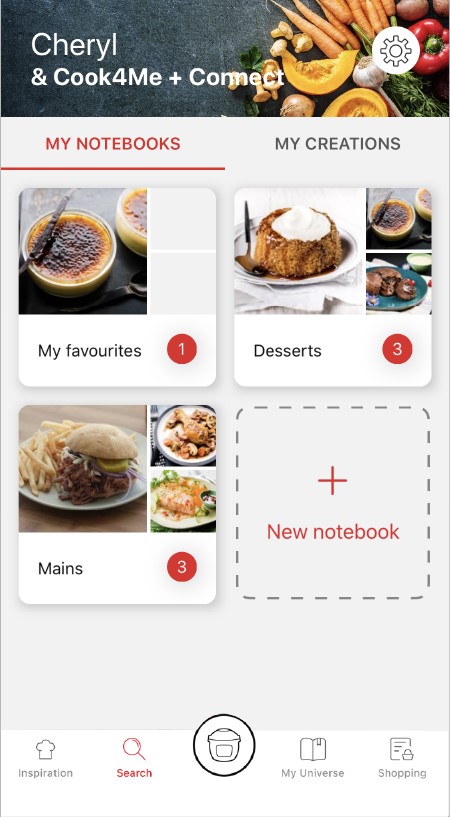
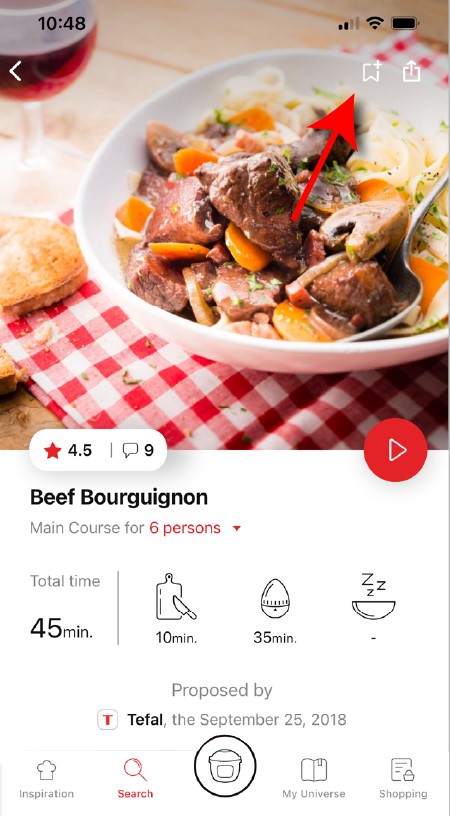
• Go to the recipe you wish to bookmark and select the bookmark logo in the top right corner. • A "My Notebooks" tab appears: select the "My Favorites" location. • The recipe has been added.
The application has rich content and requires a stable Wi-Fi connection to download correctly. If your application does not download correctly, delete it and try to download again when you have a more stable Wi-Fi connection. During initial installation, the download may take several minutes while the application saves all the photos on your Smartphone or tablet.
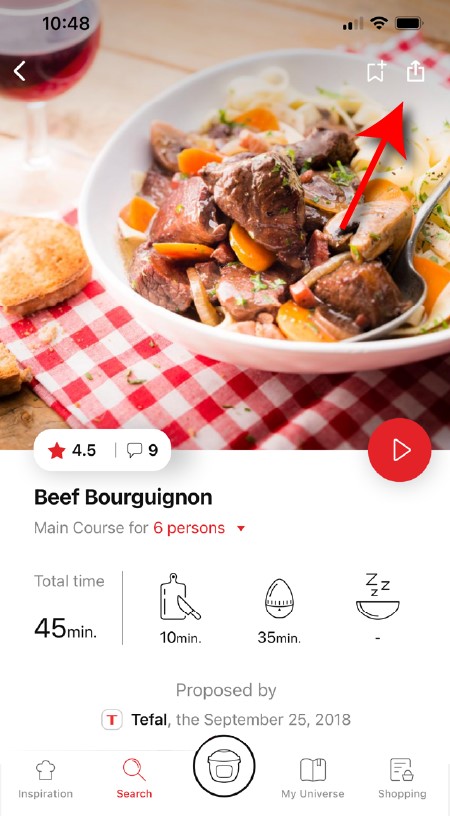
You need to create an account and sign in to the application in order to access this feature. Click the sharing logo to view the sharing options. You can then choose how you would like to share this recipe.
Your application uses notifications to alert you at the end of cooking times using a beep. If you want to turn off this signal, simply deactivate it in your tablet or Smartphone. You may also disable sounds in the parameter settings for notifications on your telephone or tablet.
Your application uses notifications to alert you when your cooking is finished but also to let you know when new content (information, recipe...) is available. If you wish, you can disable them from your smartphone settings.
Once you have completed your search, specific filters make it easier for you to find the recipes that meet your needs.
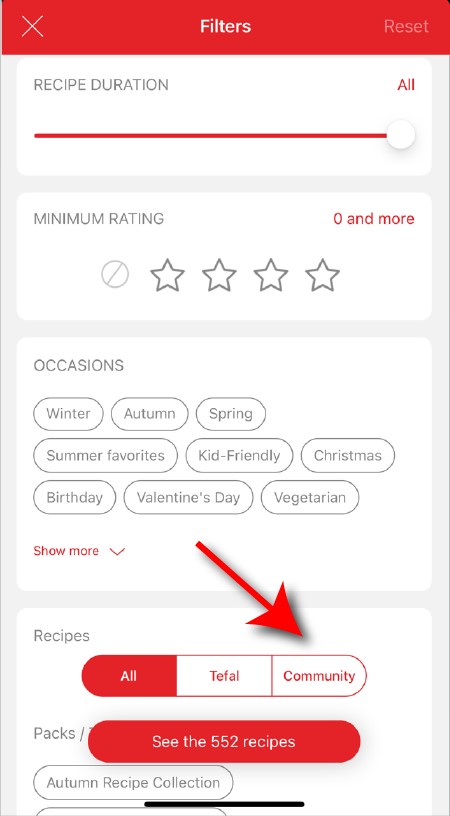
The customizable filter: • Click on "Filter" in order to sort the recipes according to the type of dish (starter, main course, dessert), the time it takes to make the recipe, the minimum rating, their themes (or packs)... • You can also choose to select only the recipes of the brand or the recipes proposed by the community.
Sorting recipes: Once you have made a search, you can sort your recipes by popularity, rating, age or alphabetical order.
When using the search function, select "Filter recipes". In the "Recipes" section, select "Community" only. You will then be able to see the recipes from the community.
You must create an account and log in to your app to access these features.
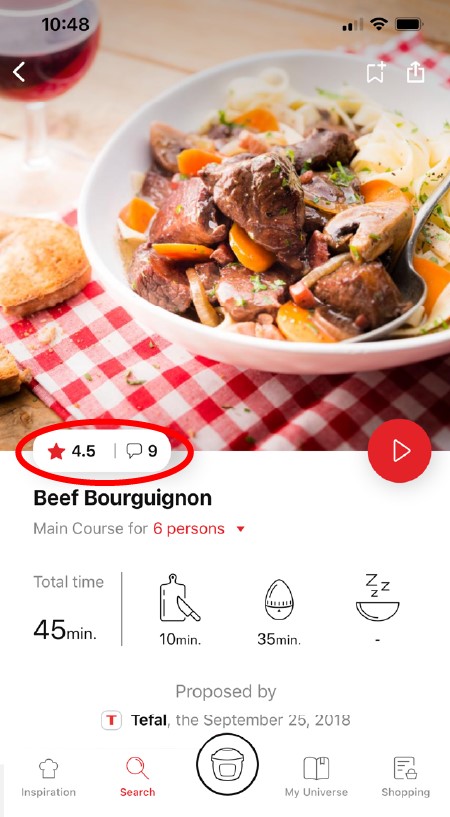
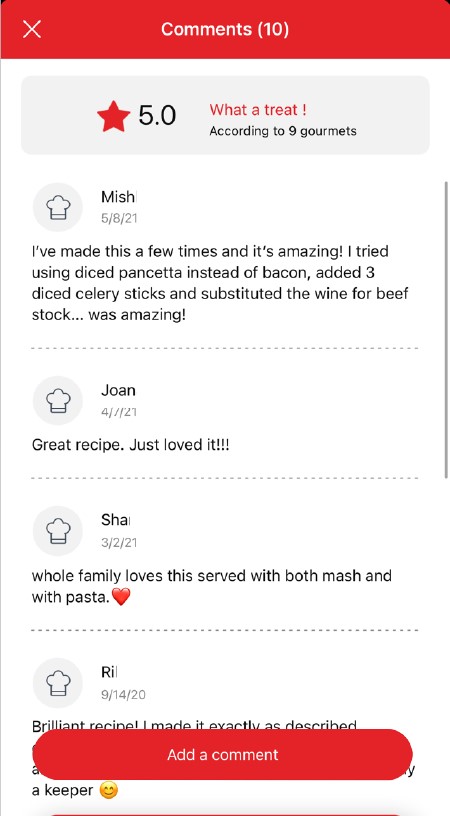
Once logged in, you will be able to read the comments and see the notes that community members have given to the recipe by clicking on the notes/comments area.
You must create an account and log in to your app to access these features.
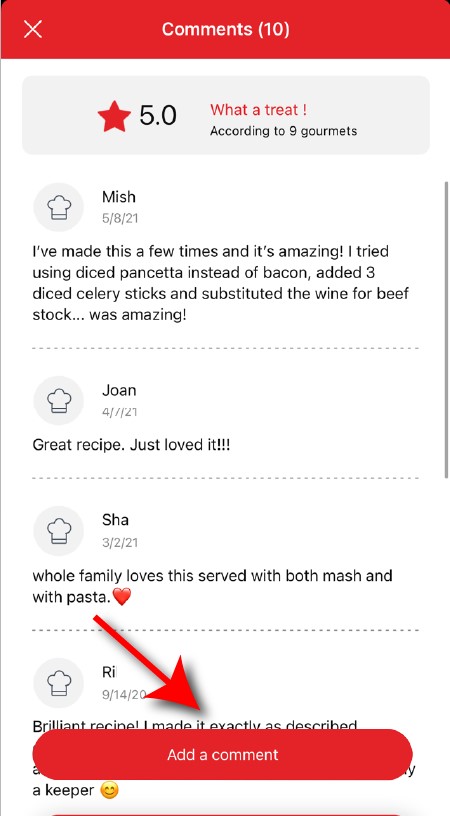
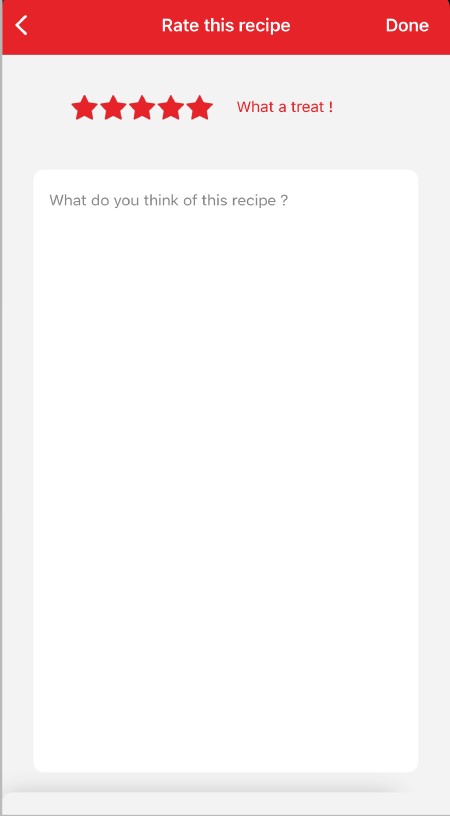
Once logged into your account, you will be able to rate the recipe and add a comment by following the instructions that appear on the screen after clicking on the notes/comments space.
Choose the "My Universe" tab in the navigation bar, then select the booklet you wish to modify or delete. Click on the pencil at the top right of the screen, then select the action you are looking for ("Delete booklet", "Rename booklet" or "Delete recipes").
You must create an account and log in to your app to access this feature.
• Choose the "My Universe" tab in the navigation bar. • There, you will find your recipe booklets and can create new ones by clicking on "New booklet".
It is important to select your product in the app in order to find the right recipes for that product. This way, the app will suggest hundreds of ideal recipes. It will also let you add your accessories and access the associated recipes.
The app is no longer compatible on Android versions 4.4.4 or lower, because of reinforced data security.
As far as possible, we recommend that you update your device to a higher Android version or use another compatible device.
Updates will not only allow you to enjoy a richer experience with new features and compatibility with the latest technology, but will also protect you against possible security vulnerabilities that have been fixed in the latest versions.
• In "My universe", select "My profile". • Click on the image of the registered product. • Click on "Remove the product". The app will then ask you to select a product.
Wash the cut chips twice in a bowl of water before cooking to remove any excess starch. It is then essential to dry them thoroughly before cooking in a clean, absorbent tea towel and finally patted dry with kitchen paper. If you are cooking frozen chips you do not need to add any oil as these already contain oil and could make the chips soggy. If using the 2 in1 feature (bowl + tray) after the food is cooked on the tray, cook the chips for a further 2-5 minutes after you've removed the tray to make them crispier.
There are many possible reasons: • You may not have used the right variety of potatoes. • The potatoes were insufficiently washed and dried prior to cooking and still contain too much starch. • The chips are too thick. Cut the chips thinner. • You have not used enough oil. Increase the amount of oil. • The filter may be obstructed. Clean the filter. (ActiFry models only)
The size of the chip affects how crunchy or soft it is. The thinner the chips, the more crunchy they will be and conversely, thicker chips will be softer inside. Depending on your taste preferences, you may vary the cooking time and the cut of your chips: thin: 8 x 8 mm/Standard: 10 x 10 mm/Thick: 13 x 13 mm.
For best results, wash the whole potatoes and then sliced potatoes in plenty of water until it runs clear. This allows you to remove as much starch as possible to prevent the chips from sticking together. Dry them thoroughly using a dry, absorbent kitchen towel. The chips should be completely dry before cooking.
You can vary your pleasures and use different oils! Standard oils: olive, rapeseed*, grape seed, corn, peanut, sunflower, soybean* Flavoured oils: aromatic herbs, chilli, garlic, lemon... Special oils: hazelnut*, sesame*, safflower*, almond*, avocado*, argan*... We advise against using walnut oil, which results in a rancid taste after cooking. (* cooking oil according to manufacturer).
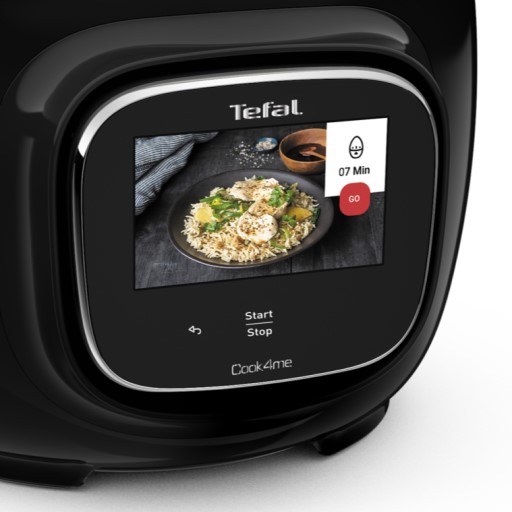
• Start/Stop button: touch the white spot at the bottom of the screen to turn on your device. • Touch screen: scroll the screen with your finger and select your feature. • Back key: once you have selected a feature, a back button will appear at the bottom left to return to the previous screen. It does not appear when you are on the home screen.
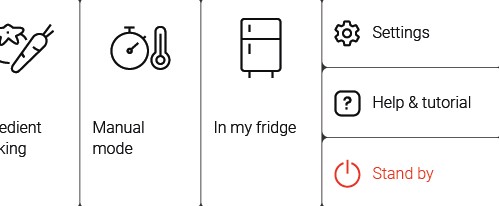
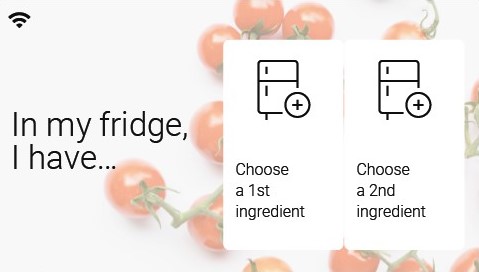
Thanks to the function "In my fridge" you can indicate the ingredients that you have at your disposal and we will suggest suitable recipes.
• You can access this feature from the home screen. • Add one or two ingredients by typing their name in the search bar and selecting it from the suggestions. • You can then enter the weight of the added ingredients so that we can offer you recipes for those quantities.
Access the home menu using the "Contextual Menu" touch button on the right side of the screen. This button also allows you to return to put your appliance on standby.
Thanks to the library, find the recipes integrated in your appliance. Thanks to the connection with your application, you'll have access to more recipes from the brand and the community!
• You can access the recipe library from the "Inspiration" menu. • Keep in mind that if you are not connected to the WiFi, you will only have access to the list of recipes integrated into your appliance. • When you are in the library, you can scroll through the recipes.
• You can find the recipe booklets that you created with the app. • You can access the recipe library from "My Universe". • Please note that if you are not connected to your user account, no recipe will appear. • You have to go through the app to add or remove recipes from your booklets.
The list of cookings by ingredients offers you cooking times and cooking modes adapted to the quantity you have at your disposal. There are 5 categories of food: Starches, Vegetables, Fishes, Meats and Eggs. You can access the ingredients cooking list from the home menu under "Cooking ingredients".
There is no danger in pulling out the basket during cooking, but it is not recommended. This will lower the temperature inside the device and, for "Smart" recipes, it may disrupt the cooking settings designed for optimal results.
Express cooking allows you to cook very quickly your recipes for soups, purees, compotes, meat chunks recipes, pasta or rice dishes...
What you need to know: • The filling level of the bowl should never exceed the MAX level. • For food that can expand during cooking (rice, seeds, lentils, peas, etc.), do not fill the bowl beyond half its maximum capacity. • The bowl should always be filled with a minimum of 250 ml of liquid. • When the timer reaches 0 and the following screen appears, you will notice a release of steam at the back of the lid.
CAUTION: Do not put your hands near the steam outlet! It is possible that a slight flow of steam may escape from the back of the product during cooking.
Strong browning allows you to brown ingredients strongly and gives a golden and crispy appearance to all types of ingredients such as potatoes, meat...
Ingredients should never be filled above the MAX level. The lid must always be open.
You control the cooking time. Leave the ingredients to cook until you are satisfied with the result. Then click 'STOP' to stop cooking.
• Low temperature cooking is ideal for long cooking times, up to 12 hours, with the lid closed for a tender and very melting result. • Classic simmering is used with the lid open to thicken or reduce a sauce at the end of cooking.
• The "Sous vide immersion" mode cooks the vacuum-sealed ingredients and immersed in 3L of water. • The "Sous vide Eco" mode cooks the ingredients with only 5 cl of water using the steam basket.
• The "Gentle steam" mode is ideal for healthily cooking delicate ingredients such as fish and seafood. • The "Boost steam" mode is more suitable for meat or vegetables.
Clean the device with a damp, non-abrasive sponge and washing-up liquid. Do not use any aggressive cleaning agents, scouring sponges or abrasive pads. Do not use any special metal cleaning agents. Never immerse or run the appliance under water.
You have probably salted your food during the cooking process. Don't salt your food before the end of cooking to avoid scratching. For models using the tray, and to preserve its qualities for longer, do not use any metal utensils.
• Check that the opening handle is in the open position before moving the lid to the closed position (open padlock). • Check that the nut of the metal lid is quite tight. • Check that the violet ball cap (located on the top of the metal lid) is in the correct locked position (closed padlock). • If you are at the end of cooking and you want to close the lid, wait until the hot vapours have dissipated before closing the lid. • Check for foreign bodies between the bowl and the heating plate. Remove the bowl and check that the heating plate, the central element and the underside of the bowl are clean. Also check that the central element can move freely. • The bowl may be deformed (after an impact, fall...). The bowl must be changed at an authorised service centre.
Your product is not connected to the WiFi (via the modem or via a mobile phone). Therefore, you can only access the 250 recipes contained in your product. We advise you to check that WiFi is activated on your modem/phone and to get closer to your modem/phone. We remind you that your product cannot connect to a 5GHz WiFi network, a WiFi network with a password containing special characters, as well as open WiFi networks (which do not require a password).
Your product is connected to the WiFi (via modem, mobile phone,...), but not connected to the database. Therefore, you can only access the 250 recipes contained in your product.
Your product is connected to the WiFi (via modem, mobile phone,...) and to the database. As a result, you can access more than 1,500 recipes.
1. Check that the appliance is not in standby mode by pressing the rotary knob. 2. Make sure that the power cable is connected to the power supply. 3. If the product is powered, unplug the power cord for 10 - 15 seconds and then plug it back in. If the problem persists, contact our customer service or take your appliance to an approved service centre.
To view the images, it is necessary to authorize the downloading of photos via a Wi-Fi connection. This validation takes place at the initial startup of the device. This setting can be changed in the "Settings" section of the Cookeo.
There could be several explanations: • The appliance is not properly plugged in. • You have not yet pushed the power button or you have pushed it incorrectly. Try again by pushing it firmly. • You have pushed the power button, but the appliance still does not work. Check that the lid is securely closed. • The engines are running but the appliance does not heat up. Take the appliance to an Authorised Service Centre to have it checked.
6 jars set (ref. XA606000): You can place 4 jars underneath and 2 jars on top. Be careful to place the two upper jars towards the front to prevent them from tipping over or hindering the lid from closing.
8 jars set (ref. XA6140E0): You can place the 8 jars with the 2 supports of 4 jars one on top of the other in the bowl.
Yes, this is a genuinely multi-purpose appliance, which can be used to cook a wide range of foods. Your appliance can be used for numerous recipes, from starters to desserts. You can also make crispy chips, tender chicken or even fruit cake…


 The product is not connected.
 The product is connecting.
 The product is connected.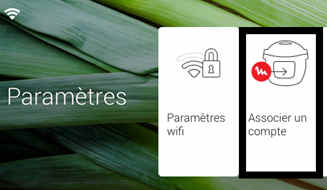

 Cookies are used for audience measurement and personalization to help us improve your use of the product.